

SSO sign-in refused
When DASH can’t complete a single sign-on, you return to the DASH sign-in page with a message explaining why. You are not signed in. This page lists each message, what causes it and how to fix it.
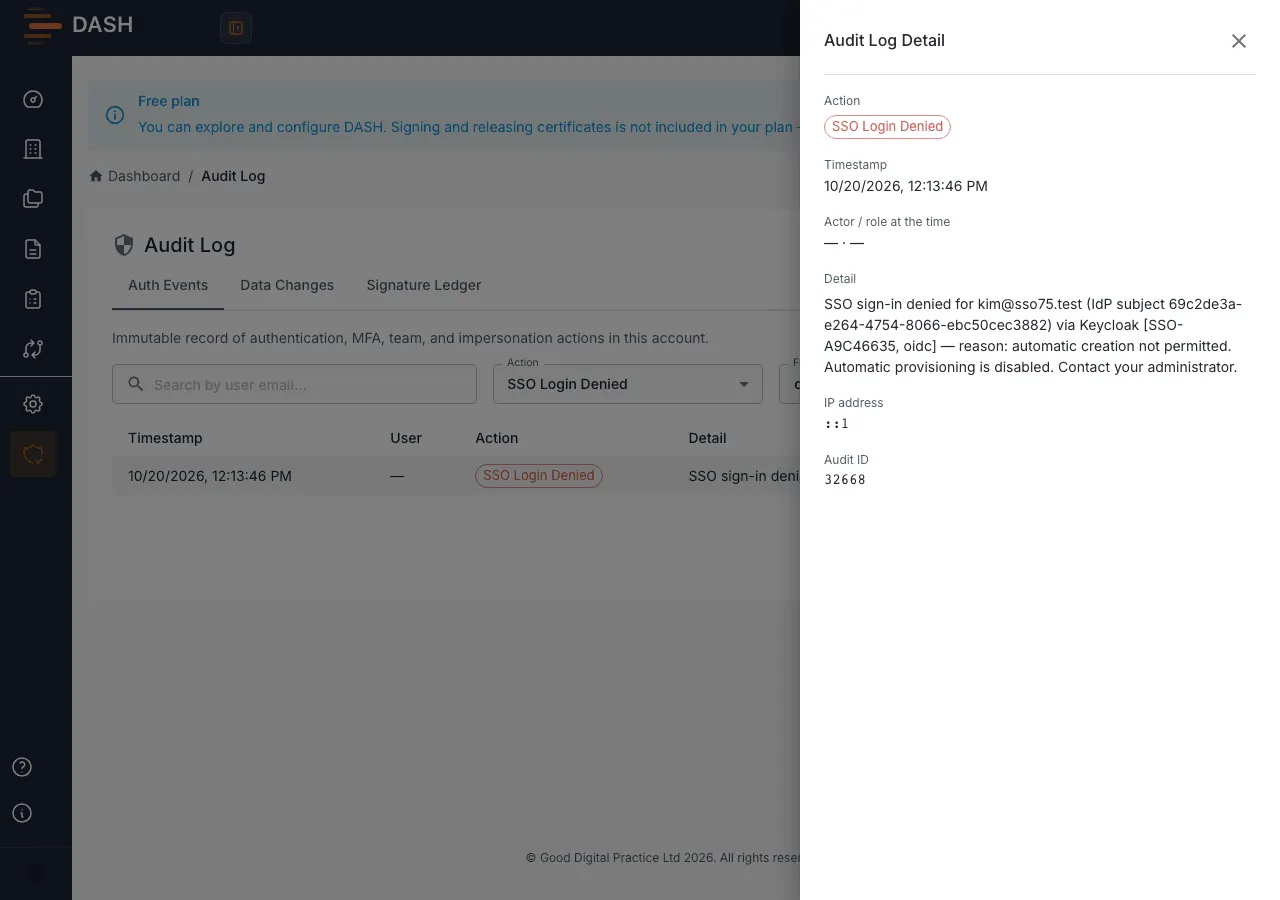
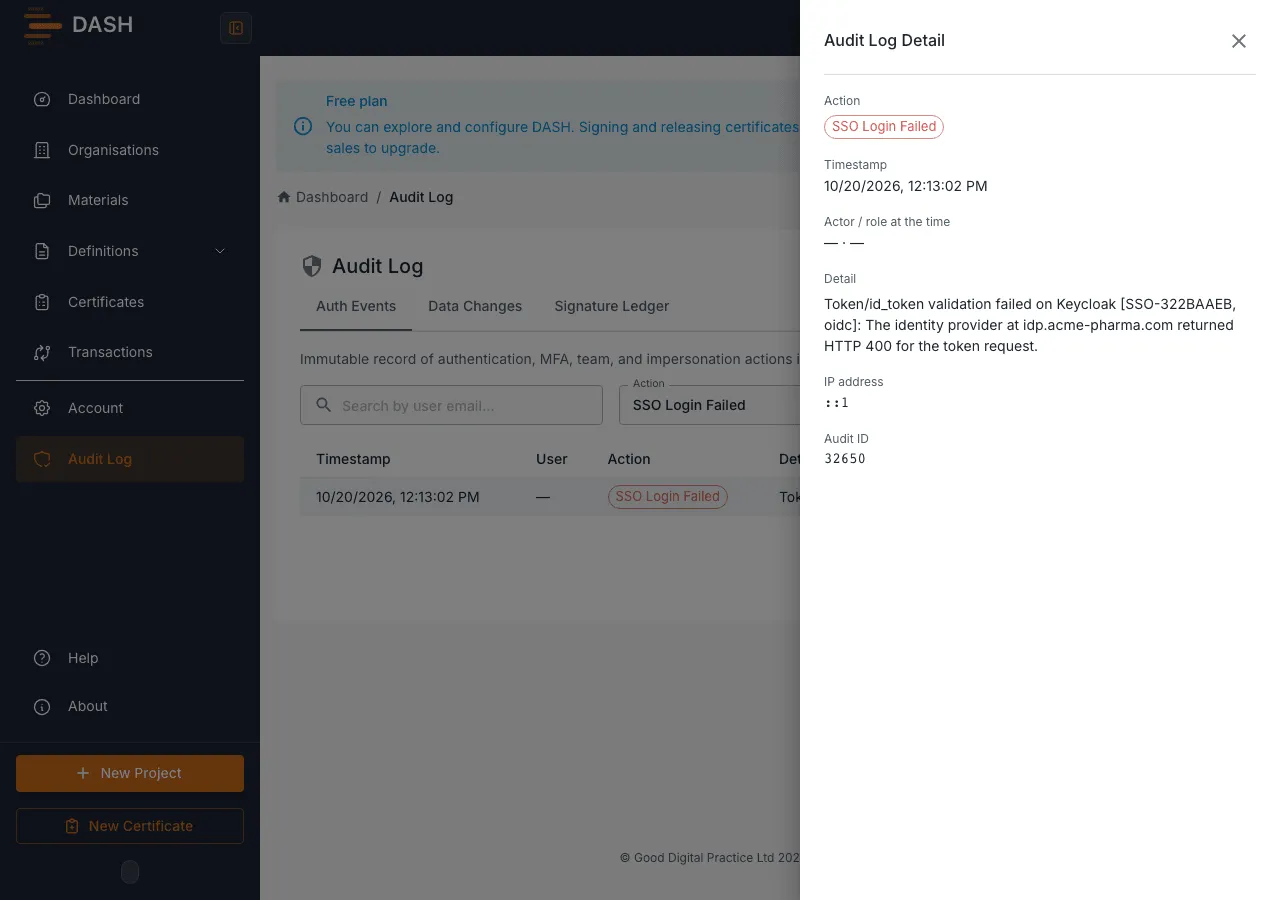
Messages never reveal whether an address has a DASH account, which organisation holds a domain, or technical details from your identity provider. Your Admin can see the exact reason for each refusal in the Audit Log (see For Admins: find the reason in the Audit Log).
Messages about your access
Section titled “Messages about your access”| Message | What it means | What to do |
|---|---|---|
| “You do not have a DASH account yet, and automatic account creation is turned off for your organisation. Ask your administrator to invite you.” | Your organisation doesn’t let DASH create users automatically, and you aren’t a member of its account yet. You may see this even if you already use DASH with another organisation. | Ask your Admin to invite you, or to switch on just-in-time provisioning. |
| “Your identity provider groups do not give you a role in this DASH account, so access was refused. Contact your administrator.” | None of your groups at your identity provider is mapped to a DASH role, and the connection has no default role. This also happens to existing members who were moved out of their mapped group. | Ask your Admin to add you to a mapped group at your identity provider, or to set a default role. See Group-to-role mapping. |
| “Your email domain is not verified for single sign-on with this organisation, so you could not be signed in. Contact your administrator.” | Your email domain is claimed by the connection but not verified yet. DASH never signs anyone in on an unverified domain. | Your Admin must verify the domain. Until then, sign in with your DASH password if you have one. |
| “Your identity provider did not share a usable email address, so you could not be signed in. Ask your administrator to check the single sign-on attribute mapping.” | DASH didn’t receive an email address for you (or received a username instead). | Your Admin should check the Email address field under Attribute mapping, and that your identity provider sends your email. |
| “Your access to this DASH account has been deactivated. Contact your administrator.” | An Admin deactivated your membership in this account. SSO never reactivates a member. | Ask your Admin to reactivate you. See Deactivate and reactivate users. |
| “Your organisation has no free user seats on its DASH subscription, so you could not be added. Contact your administrator.” | Adding you would go over the account’s member seats (or signer seats, for a role that signs), or the subscription isn’t active. Existing members are never refused for this. | Your Admin can free a seat by deactivating someone, or contact DASH sales for more seats. |
| “Single sign-on was refused for your account. Contact your administrator.” | DASH refused the sign-in for another policy reason. | Ask your Admin to check the Audit Log entry. |
Messages about the sign-in itself
Section titled “Messages about the sign-in itself”| Message | What it means | What to do |
|---|---|---|
| “Your single sign-on attempt expired or was already used. Please start again.” | Each SSO sign-in can be used once and only for a short time. You took too long, used the browser’s back button, or opened an old sign-in link. | Go to the sign-in page and select Continue With … again. |
| “This sign-in response did not match a sign-in started here. Please start again.” | The response from your identity provider doesn’t belong to a sign-in started in this browser (for example you started in one browser and finished in another). | Start again from the DASH sign-in page, in one browser. |
| “The response from your identity provider was incomplete. Please try again.” | Your identity provider sent back too little information. | Try again. If it keeps happening, tell your Admin. |
| “Your identity provider’s response could not be verified, so you were not signed in. Try again, or contact your administrator.” | DASH couldn’t verify the response’s signature or origin. Common causes are an expired or changed certificate or secret at your identity provider. | Try again. If it keeps happening, your Admin should check the connection and select Test Connection. |
| “Single sign-on could not be started with your identity provider. Try again, or contact your administrator.” | DASH couldn’t send you to your identity provider. | Try again later. If it persists, your Admin should test the connection. |
| “This single sign-on connection is not available. Contact your administrator.” | The connection has been switched off or deleted. | Ask your Admin. If you have a DASH password, you can sign in with it while SSO is off (unless you joined through SSO). |
| “Sign-in was cancelled or refused at your identity provider.” | You cancelled at your identity provider, or it refused you (for example you aren’t assigned to the DASH application there). | Try again, or ask your IT team to give you access to DASH at your identity provider. |
| “Your identity provider needs you to sign in again. Please try again.” | Your session at your identity provider has ended. | Select Continue With … again and sign in at your identity provider. |
| “Your identity provider reported an error and did not complete the sign-in. Please try again.” | Your identity provider had a problem. | Try again later. If it persists, contact your IT team. |
| “Single sign-on did not complete, so you were not signed in. Please try again or contact your administrator.” | Any other failure. | Try again. If it persists, ask your Admin to check the Audit Log. |
Problems on the sign-in page
Section titled “Problems on the sign-in page”- There’s no Continue With … button. DASH offers it only after you type your email address and move out of the field, and only if your domain is Verified on an Enabled connection. Check the address, then ask your Admin whether SSO is set up for your domain.
- The Password field has gone. Your organisation requires SSO for your domain (“… requires single sign-on for your organization.”). Use Continue With …. See Enforce SSO and break-glass recovery.
- “Break-glass sign-in refused. Your organisation requires single sign-on via …” You selected “Platform administrator? Use break-glass sign-in”. That route is only for DASH platform administrators. Go back and use Continue With ….
- “Invalid email or password.” when you type a password. If DASH created your user through SSO, you have no DASH password, and Forgot Password? won’t send you one. Use Continue With …. See Just-in-time provisioning.
- Your identity provider is down and you can’t sign in at all. Ask your Admin. If SSO is enforced and nobody in your organisation can sign in, your Admin should contact DASH support.
For Admins: find the reason in the Audit Log
Section titled “For Admins: find the reason in the Audit Log”Every refusal is recorded in your account’s Audit Log:
- SSO Login Denied when your settings refused the person. The detail gives the email address tried and the reason, for example automatic creation not permitted.
- SSO Login Failed when the identity provider’s response couldn’t be verified. The detail says what failed.
See SSO in the audit log.