

Retry a failed transmission
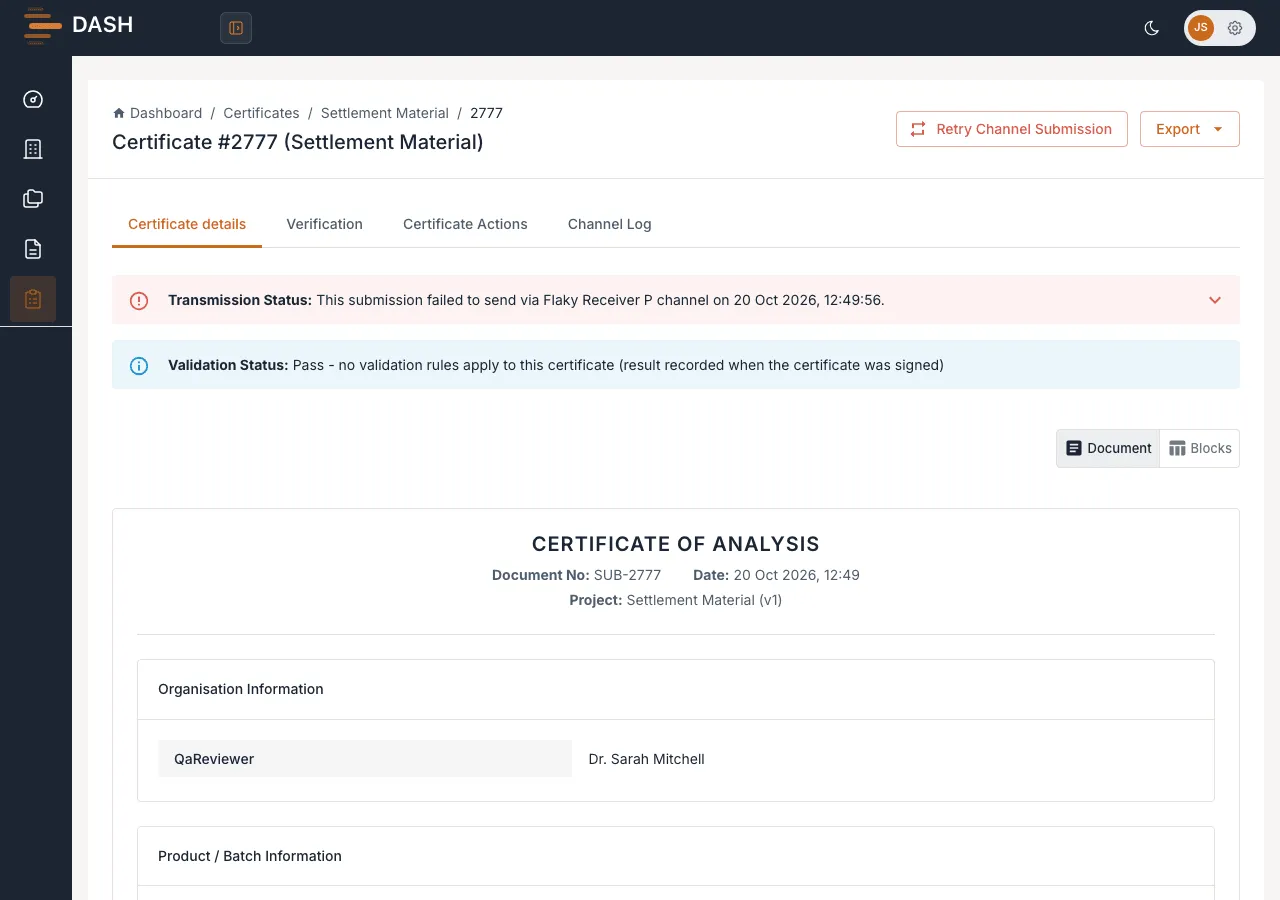
When the receiving organisation’s system rejects a released certificate, or can’t be reached, the certificate’s chip reads Fail. You don’t need to sign it again. Once the cause is fixed, the Quality Person (QP) re-sends the same released document with Retry Channel Submission.
Is it a failed transmission?
Section titled “Is it a failed transmission?”Retry Channel Submission is only for a delivery that failed. Other problems are recovered in other ways:
| What you see | What went wrong | How to recover |
|---|---|---|
| Chip Fail; “This submission failed to send via … channel” | The receiver rejected the delivery, or couldn’t be reached. | Fix the cause, then Retry Channel Submission (this page). |
| Chip Pass; Storage Channels banner shows a failure | An archival copy failed. The release itself succeeded. | Retry followed by the channel name, on the Channel Log tab. See Archival copies. |
| Chip Output generation failed | The released document couldn’t be produced. Nothing was sent. | The QP selects Retry Output Generation at the top of the record. This runs the release again from production. If it fails again for the same reason, see Submission failures. |
| Chip Validation Failed | An error rule failed at the final check. Nothing was sent. | There is no retry. Correct the data. See Validation failures. |
| Chip Draft, with an “Ingestion failed — …” banner | The source file couldn’t be read. | There is no retry. Upload a corrected source file on the Certificate details step, or send it again through the source channel. See Create a certificate. |
| Chip Submitting, with “Release on hold until a signing key is available” | No signing key is available yet. | Nothing to do. The release continues automatically. See Submit a certificate and track it. |
1. Find out why the delivery failed
Section titled “1. Find out why the delivery failed”- Open the certificate from Certificates. To list every certificate whose delivery failed, use the status filter Submit Failed.
- On the Certificate details tab, expand the Transmission Status banner and read the Error and the Raw API Response. They hold the receiving system’s own answer.
- For the history of attempts, open the Channel Log tab and expand the failed row to read its Error Details.
2. Fix the cause
Section titled “2. Fix the cause”A retry repeats the same delivery, so fix the cause first:
- A rejected credential or wrong address: ask someone who manages the Material’s data channels (for example an Admin or Project Manager) to correct the channel on the Data channels tab and run Test Connection. The retry uses the channel’s current settings. See Credentials and testing.
- The receiving system was down: wait until it is back.
- The receiver rejected the content (for example “Batch already registered” in its reply): agree the next step with the receiving organisation. Re-sending the same record will be rejected again.
- More causes: Data channel troubleshooting.
3. Retry
Section titled “3. Retry”- Select Retry Channel Submission. It appears at the top of the certificate record and on the Channel Log tab.
- The chip changes to Submitting while DASH sends again, then settles at Pass or Fail.
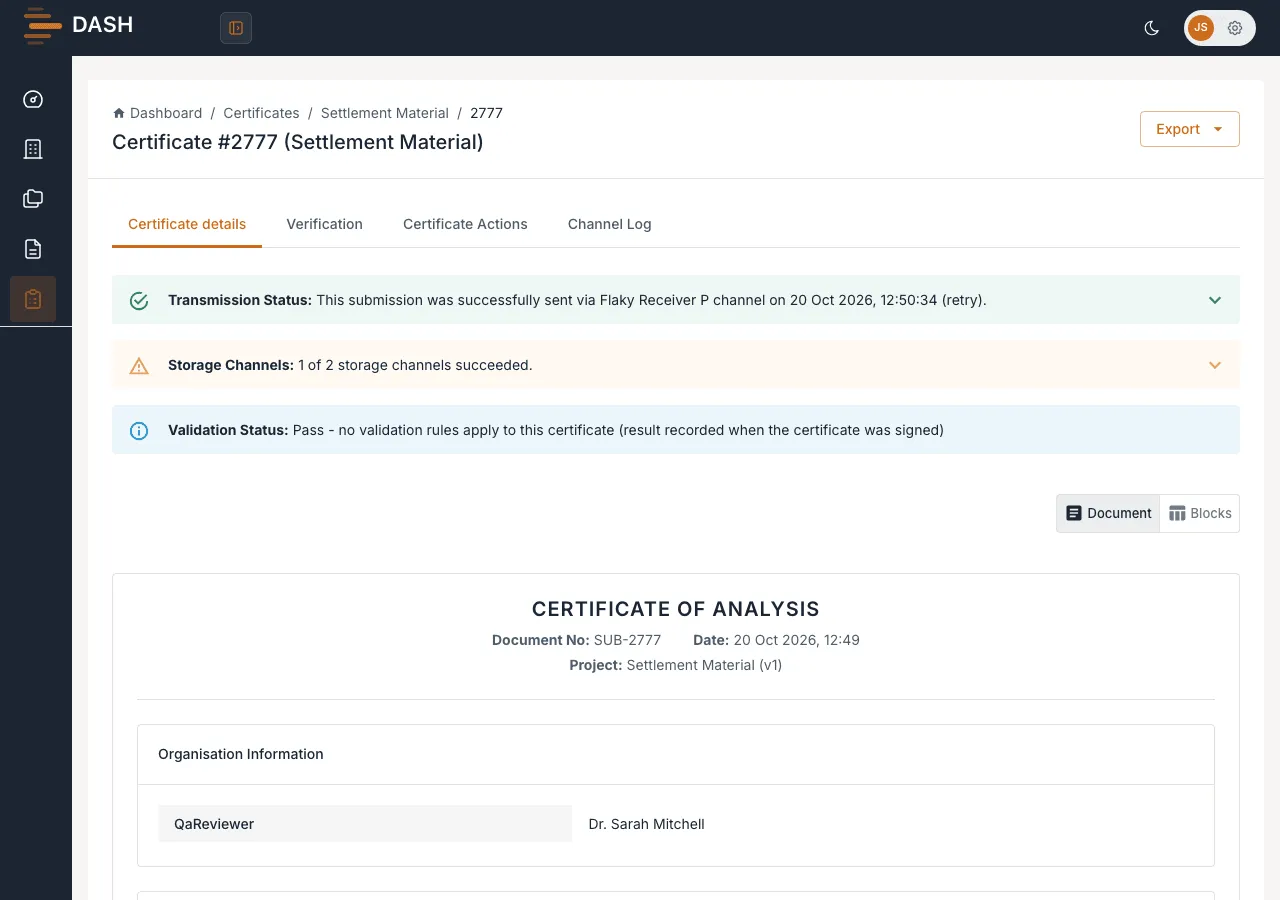
When the retry succeeds:
- the Transmission Status reads “This submission was successfully sent via [channel] channel on [date and time] (retry).”, and Retry Channel Submission disappears;
- the Channel Log gains a separate Retry Channel Submission row, and the original failed row stays exactly as it was;
- the Audit Log records the retry under Certificate Transmitted;
- archival copies are sent to the Material’s storage channels.
If the retry is refused, a red message under the button gives the reason.
Where you can’t retry
Section titled “Where you can’t retry”- The Transactions page. It is read-only. Retry from the certificate itself.
- A certificate that passed. A Pass certificate never offers Retry Channel Submission.
- A failed delivery with no stored output. DASH refuses the retry, because there is nothing released to re-send.