

Sealed PDF and long-term validity
When a signed certificate is released, DASH seals what it sends: the machine-readable XML output and a PDF copy of the certificate. A seal is a cryptographic stamp applied with the platform’s signing key. It proves the document came from DASH and hasn’t been changed since, and DASH keeps it verifiable for as long as the record is retained.
Signature and seal: what’s the difference?
Section titled “Signature and seal: what’s the difference?”| Electronic signature | Seal | |
|---|---|---|
| Who applies it | A person: the Quality Person (QP) and any named workflow signers | DASH, with the platform’s signing key |
| When | Before release, on the Sign step | At release, after you select Submit |
| What it proves | Who approved the certificate, when, with what meaning | That the released XML and PDF are exactly what DASH released, unchanged |
| Where you see it | The certificate’s signing workflow and Authorization block | The Verification tab of the released certificate |
The seal carries the signatures inside it: the sealed PDF lists every signer, and the sealed XML carries the signatures chosen by the Material’s Signatures in output XML setting. See Signing workflows.
What gets sealed, and when
Section titled “What gets sealed, and when”- The XML output is sealed at release. Nothing is transmitted until it is sealed. See Submit and track.
- The PDF copy is rendered once, at release, from the same released data, and sealed shortly afterwards. While it is being sealed, the record’s Export menu shows PDF sealing… (greyed out). When sealing finishes, Export as PDF downloads the sealed copy. DASH never hands out an unsealed copy in its place.
- Storage destinations receive the sealed PDF once it is ready, if the Material’s storage channel carries a PDF copy. See Archival copies.
Before release, Download Preview PDF gives an unsigned preview stamped UNSIGNED PREVIEW - NOT RELEASED on every page, so a preview can never pass for the released record. See Output XML and PDF.
Long-term validity
Section titled “Long-term validity”The certificates behind a seal expire after a few years, but a certificate of analysis has to stay provably authentic for much longer. DASH handles this for you:
- The PDF is sealed at the archival level (shown as Seal level: PAdES-B-LTA). The seal carries a trusted timestamp and everything needed to check it later, so it can be validated even after the sealing certificate has expired.
- The archival timestamp is renewed automatically before it ages, without changing the seal itself. Each renewal is recorded in the certificate’s signature ledger.
- DASH never seals at a weaker level. If the archival seal can’t be produced, DASH retries and, if it still can’t, holds the PDF copy for quality review. The record then reads “Sealing the PDF copy failed and is awaiting quality review.” Contact DASH support.
- Old keys stay verifiable. DASH keeps a permanent register of every signing key it has used, so a seal can be checked against the key that applied it, even after that key has been replaced or retired.
Verify a seal in DASH
Section titled “Verify a seal in DASH”Anyone who can open a released certificate can verify its seal. Verification is read-only: nothing is recorded or changed.
- Open the released certificate from Certificates.
- Open the Verification tab and scroll to Seal verification.
- Select Verify Seal (Verify Again to repeat the check).
DASH checks each sealed output against the key that sealed it and shows, for the Machine-readable output (XML) and the Sealed PDF copy: Sealed by key, Sealed at, the Verification outcome, and the Compromise cut-off of that key. For the PDF, it also shows the seal level.
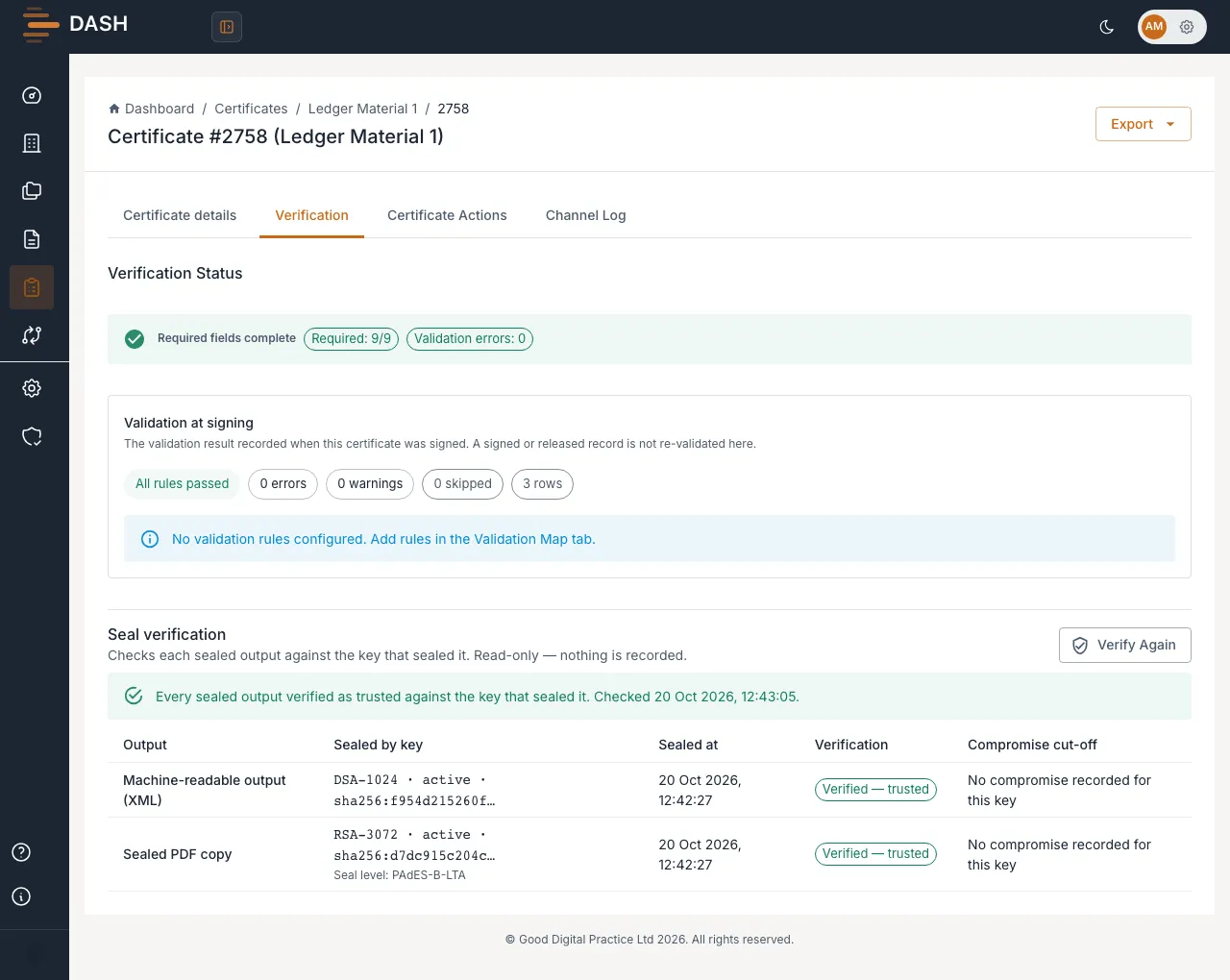
What the outcomes mean:
| Outcome | Meaning | What to do |
|---|---|---|
| Verified — trusted | The seal is valid, applied by a registered DASH key while it was authorised, and matches a release DASH recorded. The document is unchanged. | Nothing |
| Verified — trusted (released before the signature record was kept) | As above, for a certificate released before DASH kept its current signature record. | Nothing |
| Warning — not fully trusted | The seal is valid but something can’t be confirmed, for example a timestamp that can’t be verified. | Treat with care and contact DASH support |
| Not trusted — no release by DASH accounts for this seal | The seal is valid, but DASH has no record of releasing this document. | Don’t rely on it. Contact DASH support |
| Not trusted — verification failed | The seal doesn’t check out, for example the document was altered or it was sealed at or after the time its key is considered compromised. | Don’t rely on it. Contact DASH support |
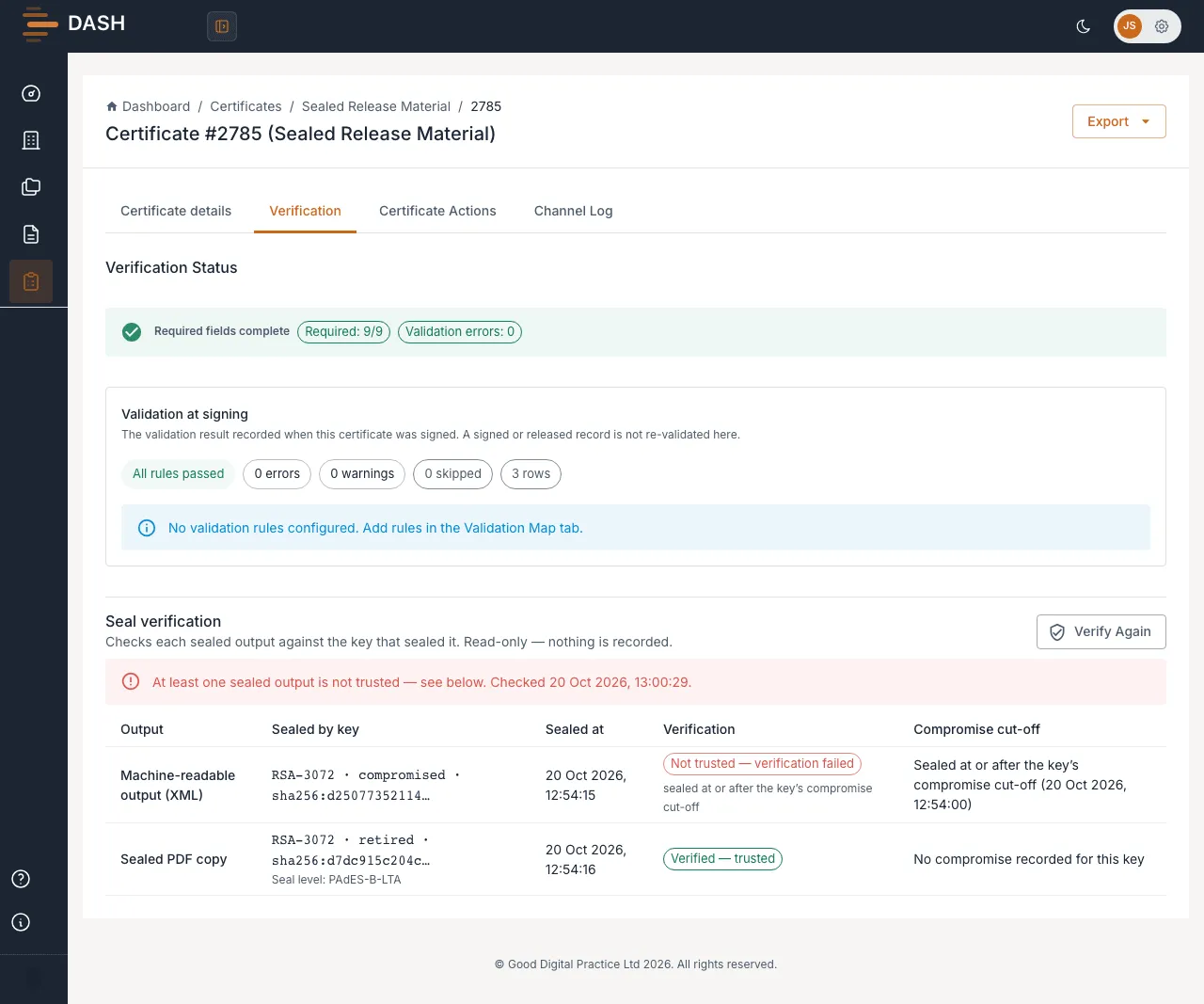
If an output isn’t sealed yet, the row says so instead, for example “Sealing in progress — the PDF copy is sealed after release.” or “Not yet sealed — the certificate has not been released.”
Verify a seal outside DASH
Section titled “Verify a seal outside DASH”The sealed PDF is a standard digitally signed PDF. A recipient who receives it, for example from a storage destination, can open it in a PDF reader that shows digital signatures to see that it is sealed, when it was sealed, and whether it has been changed since. Whether the reader shows the sealing certificate as trusted depends on that reader’s own trust settings. For an authoritative check, a DASH user with access to the certificate can run Verify Seal, or you can contact DASH support.
What only DASH staff do
Section titled “What only DASH staff do”Some parts of this protection are run by DASH, not by your account:
- Signing-key custody: creating, rotating, suspending and retiring the platform’s signing keys, under dual control.
- The daily ledger digest: once a day DASH commits each account’s signature-ledger entries to a single digest that can be re-checked later. Re-checking a past digest is a platform operation.
If you need evidence from either, for example for an inspection, contact DASH support. Your Admins can review the ledger itself, with an integrity check, under Audit Log → Signature Ledger. See Signature ledger.